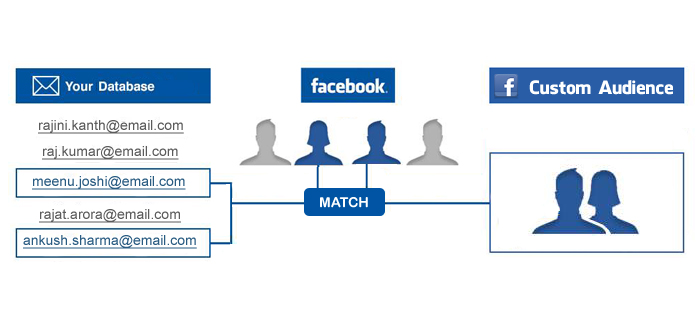
What if I told you that Facebook constantly monitors our activity and puts us into different interest groups for advertisers to target? Ever have an ad show up for shoes just 5 seconds after you were JUST looking at the exact pair on Nike.com?
Through the Business Manager platform on F.B., advertisers can drill-down their ads to almost the exact, and even sometimes the exact person. These strategies are all done in the custom audiences tool.
Facebook is constantly changing, and by constantly I mean almost every day. Looking back just a few months ago, the capabilities of the advertiser have grown significantly. But, there is also the challenge to create more engaging content with their newsfeed change which is something I talked about in a couple of posts back.
Alright back to the custom audiences. Below is a list of options available when creating a custom audience.
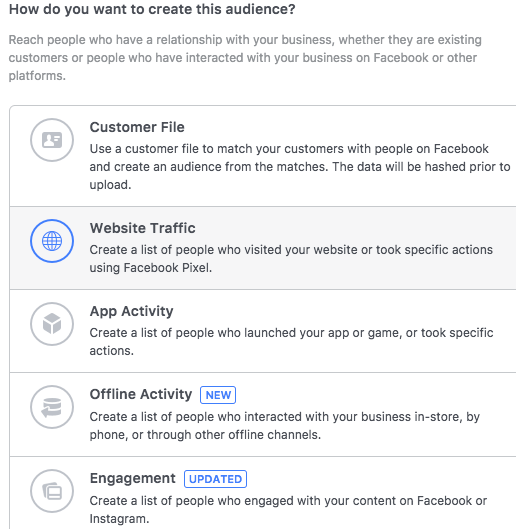
Customer File-
Advertisers can import data such as email addresses, phone numbers, mobile advertiser ad, Facebook app user id, and so on. I like to create audiences from email databases and shopper data.
There is also the option to sync up your customer audience with a CRM, which can be done right from the custom audience sync tool. This really simplifies the process down and can be helpful when dealing with large audience groups.
Website Traffic-
This has to be one of my favorite tools in the custom audience platform. It also brings me back to my ‘shoes’ example in the beginning of this post. Let’s walk through the process.
I go on Nike.com and look at a pair of running shoes. I bounce off the page and DON’T buy the shoes. Nike wants to stay in my head and they will target ads tailored to what I just looked at. We’ve all had this happen but I’m interested to see if anyone has taken action such as completing a purchase?
This type of targeting is done by creating a F.B. pixel and installing it to a dedicated landing page. The pixel tracks your IP and then retargets to you, which is a great method of ad spend.
App Activity-
This one is fairly straightforward as it doesn’t present the advertiser with many options expect to show ads to users of the app, which is still amazing.
Creating audiences based on app activity is becoming more and more popular in the digital marketing world since app usage is at an all-time high. There’s an app for everything these days, right? Advertisers can, will, and are capitalizing on that.
Offline Activity-
A new feature in custom audiences is with offline activity. There is now the ability to track transactions ‘offline’, meaning at a physical location rather than online. This data can be pulled through a couple of different sources such as an API, offline conversion data, or by creating an offline event set.
In my opinion, this is one of the more tricky tactics when creating a custom audience. But at the same time, it can really optimize ad spend.
Engagement-
Something that has been updated (surprise!) by Facebook, but for great reason. Engagement can be defined as interactions with ads or past posts from the Facebook page.
Engagement can be pulled from a wide range of sources. These include watched videos, lead forms, fullscreen experiences, the general page, Instagram profile, and an event. In the near future, there will be a how-to for every one of these audiences.
The engagement option is simple and easy to use since there is minimal setup on the advertiser’s end.
One Last Option- Lookalike Audiences
After creating an audience base from one of the options above, there is the ability to create a mirrored version of people based on the original audience base.
F.B. will figure out the interests, habits, and behaviors of the current audience base, and then find people similar to them. It’s exactly how it sounds, it’s a lookalike audience. I also like to refer to them as a ‘copy’ audience.
Why Use?
Through custom audiences, you have the ability to see what works and what doesn’t. It could be that targeting website visitors compared to app users proves to have a more effective ROI. OR it could be the other way around for a different campaign. Nothing is fixed when working with these audiences.
This is why it is so crucial to monitor the ads and see what is working for which group and why. Anyone can show ads to anyone. What we want to do is to show ads to the RIGHT people.
My philosophy for campaigns that use custom audience audiences is quality over quantity. Target the ads directly to the people who have interests correlated with what you are trying to push.
If you have any questions or comments about the Facebook custom audience tool, please feel free to reach out.
 Andrew Chirico